Tuesday, 25 June 2019

What is Google Adsense and How to Make Money With It?

What is Google Adsense and How to Make Money With It?

What is Google Adsense and How to Make Money With It?
There are many ways to monetize your website traffic, and most of them are related to advertising third-party products or services to your website visitors. There are many advertising programs that can help you earn money nowadays, but the most popular is Google Adsense.
This advertising program was launched in the middle of 2003 by Google and is currently one of the most popular advertising programs on the Internet. It provides a good opportunity for webmasters and site owners to monetize their traffic. If you’ve asked yourself what is Adsense and how to make money with Adsense, the following article will give you some hints.
One of the advantages of what Adsense is its huge number of publishers and advertisers. Google acts as an intermediary between them, so another good feature of Adsense is its high level of security and safety for both advertisers and publishers.
How does Adsense work? The whole process is very simple and intuitive. You create an Adsense account, insert a small amount of code into your website pages –and that’s all. Google will display targeted ads on your page that’s relevant to the content of your website, your website visitors will start clicking those ads and you will be paid for it.
Google Adsense works on a cost-per-clickand revenue sharing basis. It charges advertisers per ad click and publishers get roughly 68% of the click amount. Publishers’ commission heavily depends upon the competition in niche. In practice, the commission per click can range between $0.20 and $15. The majority of niches bring less than $1 per click to publishers.
So your main task will be to provide as many clicks to those ads as possible. But do not try to cheat Google and artificially increase the number of clicks. Do not encourage your website visitors to click ads and - of course - do not click your own ads yourself under any circumstances! Google has a very accurate and complicated system for preventing click fraud. Once it notices some suspicious activity on your website or has any doubts about the quality of your traffic and clicks – it will suspend your account.
The amount you earn doesn’t solely depend on the cost per click value in your niche. It also depends upon how ads match your audience interests, where the ads are located on the page, etc. So pay attention to the content of your website, its look-and-feel, and test different placements within a page to find most efficient option.
Your earnings also depend on the amount of targeted traffic to your website. Only a very small amount of your visitors will click those ads (1-2% in average). And most of the clicks will bring you less than $1 per click. Now, you can calculate yourself how much traffic you need to earn the amount you want. Therefore, if you want to make money with Adsense you should have big traffic volumes. This will require a lot of work and a lot of unique and quality content.
Before starting a project, you can check with Google AdWords Keyword Tool for the most promising niches in terms of traffic volume, competition and cost per click. But it is always reasonable to make a website on a topic you know a lot about. In this case, it will be much easier for you to generate a lot of quality content and this work can be pleasurable. Do not expect to make $1,000 per month with a 10-page website. It is recommended to create at least 20-30 pages of content before applying it in Adsense.
Briefly summarizing, you can make pretty good money with Google Adsense, but it is not a program where you can get rich quickly. You should love the topic you are writing about and know a lot about it. This will help you get a lot of traffic and monetize it as well with Adsense.

Tuesday, 7 May 2019

Checklist For A New Website

Checklist For A New Website

website checklist

Checklist For A New Website

Launching a new website is now easier than ever. However, installing your chosen CMS (Content Management System) is just the beginning; you need to make sure your website is as friendly as it can be for both your visitors and the search engines, too. When your website is first launched, you need to avoid problems that may scare away early visitors or negatively impact search-engine rankings.
We’ve developed a checklist of 20 important tasks to complete when launching a new website that’s designed to be used with the Amazon Associates program. Your aim is ultimately to make money, and this is all about picking a topic with enough search traction and earning potential.

In this article, you will learn:

  • What to consider when choosing a topic
  • What to take care of on your new site
  • What to focus on to ensure smooth operation

Important questions to ask before you go any further:

  • Is there enough search volume for the main keywords of your chosen topic?
  • Is the topic still current?
  • Can you monitize with this topic?
If you can answer these questions honestly, to your own satisfaction – and you’re also personally interested in the subject – then these are good prerequisites for success.

(1) The Right Domain Name

Choosing the right domain is a critical first step for a new website. There are different approaches – you could put one or two matching terms in the domain, which will make it very clear what type of website it is. Alternatively, you can use a brand name for your blog/business and therefore choose a more abstract domain name. The benefit of using a branded domain is that it’s open-ended, and will allow room for development. The ideal domain name will cover both aspects.

(2) Choosing a Hosting Provider

When building your first website, find a balance between a good-quality hosting company and a reasonable price. Many professional hosting providers offer entry-level prices, so you can get started at a more affordable cost. CMS-based sites don’t have exacting requirements: but you should still understand what the hosting company is providing in terms of SQL database and PHP access – these are the technologies underpinning your site. Also, check with your hosting provider about the ease of upgrading to a more fully featured service if the need arises.

(3) CMS Installation

Whichever CMS you ultimately choose, take your time on the installation. There are detailed installation instructions and tips online or on YouTube which can help you with any problems. And although it may seem intimidating, remember that you can’t really do anything wrong during the installation. If it doesn’t work as it should, you can simply start again.

(4) Install Only the Important Plugins

Content Management Systems can be extended with plug-ins and new features. These can be very useful, and WordPress has plug-ins specifically recommended for new blogs. However, don’t overdo it. Each plug-in makes the CMS a little slower, and if you install poorly maintained plug-ins, site security can also suffer. Install new plug-ins as and when the need arises.

(5) Create an Attractive Layout

First impressions are important, so your website layout should suit your chosen topic and be pleasant and logical to use. Pay attention to using the right colors, matching fonts, designing a professional-looking logo and other graphical elements and your site will have a positive impact on new readers.

(6) Fix the Bugs

Before you launch your new website, you should ensure there are no technical errors. You can perform technical checks on your site’s HTML and CSS to ensure its code is valid: see validator.w3.org for more info. Don’t forget to test the usability of it before launching: ensure there are no incorrect readings, missing images and font problems.

(7) Test on all Major Browsers

Visitors to your site will use different devices and different browsers. It’s important to check your site works in all major browsers, including Chrome, Firefox, Internet Explorer, Opera and Safari. And check it on mobile devices, also. Google provides a test for mobile: google.com/webmasters/tools/mobile-friendly.

(8) Brainstorm Content Ideas

Before your new site goes online, you need a plan for updating it – so brainstorm some content ideas. Most will spring to mind spontaneously if you know your topic well. You can also collect more ideas using a mind map, doing competitor analysis and by conducting new research into possible content areas.

(9) Pre-populate Your Site

Under no circumstances should you start with an empty site: you should have at least a handful of articles already written. Your debut content must be compelling and of a high quality, so your new visitors will keep returning.

(10) Proofread Everything

Compelling content is a must, but your articles don’t have to be perfect. However, you must pay attention to spelling and grammar and correct as many mistakes as you can. Before publishing a new article, read it thoroughly and make the necessary corrections.

(11) Design Your Homepage for New Readers

As the ‘shop window’ of your site, your homepage is of particular importance. Many new readers will either come there directly or after reading one of your articles. Your reader should immediately recognize what your site is about – and it has to be easy for them to find other content. The contents of the homepage should be designed with new readers in mind. Include a brief introduction, explain what your blog is about and list the latest and most popular articles. Important sub-pages should all be internally linked.

(12) Provide Legal and Privacy Statements

Always include any legal requirement pages on your site to ensure your site complies with the law on the use of data online. You can find some examples of these documents available online.

(13) Optimize For Search Engines

Implementing the fundamentals of search-engine optimization will make sure search engines can find and index your website. Beyond the basics, however, SEO is a complex and hotly contested topic. It pays to familiarize yourself with it, but don’t spend time on SEO at the expense of creating compelling content for your blog.

(14) Analyze Load Times

Search engines have increasingly placed emphasis on short loading times. The average web user will leave if a website takes too long to load, which means less traffic and lower revenues. Use Google Page Speed Service Insights to analyze your own website and get optimization tips.

(15) Analyze Usability

How easy your website is to navigate is difficult to measure, but the ‘user experience’ of your site is very important. The easier a website is to use, the better: if you have the chance, ask your friends or family to use your site and give you feedback about anything they found confusing.

(16) Install Analytics

Use a web-analytics tool to find out how your website is performing, what content is particularly popular and where there are problems. Google Analytics is widely used because it is free and very powerful. An alternative is the open-source platform Piwik. Take some time to ensure all tracking is installed correctly and that you act on your findings to improve your website.

(17) Set a Backup

Few things are more annoying than losing content to technical problems or a hacker attack. A good hosting service will ensure a backup is made regularly, but there are also many useful CMS plug-ins which offer this service, too. The golden rule is: regularly backup your files, including your website’s database, so you can reinstall an up-to-date version in case of disaster.

(18) Plan Your Mid-term Content

Many new website owners and bloggers start with a lot of dedication, but after the first few weeks, begin to struggle. A content plan for the first stage of your site’s lifespan can help avoid this. You don’t have to plan every single article, but important content or important actions can and should be planned in the longer term.

(19) Begin Monetization

When should you begin to put money-earning links and adverts on to your website? It doesn’t have to be from the outset, but you should still begin relatively early. You’ll gather a lot of valuable experience and can try different types of monetized content to see which work the best. No matter when you choose to implement it, you should think about how to integrate content for monetization from the outset.

(20) Realize Nobody Is Perfect

That’s a lot of points in this checklist! But remember, preparing everything as optimally as possible is a long process and there’s no point aiming for perfection. Instead, you should get started and gain experience and feedback – your initial plans will always change. 

Just ensure that you follow the points on the checklist to avoid making any serious mistakes at the start

How To Use Statistics And Metrics To Improve Your Website

How To Use Statistics And Metrics To Improve Your Website

Stats to improve blog

How To Use Statistics And Metrics To Improve Your Website

The more you know about who is coming to your site and their behavior, the more you can refine and improve the experience your site offers to these visitors – to maximize the performance of your Affiliate Links.
You need to familiarize yourself with performance data about your site, and there is a wide range of easy-to-use tools exist to measure and understand them. Here’s a rundown of the most important key metrics to know, along with ways to interpret and use them.

YOU'LL LEARN:

  • About Basic Indicators – visitors, sessions, page views and more
  • How to find out more about who’s visiting your site
  • How to measure and improve site performance for more conversions

GENERAL BLOG METRICS:

  • Visitors: how many people are visiting your website? There are basically two types of visitors – new and returning
  • Page Views: Page views reveals how many pages a visitor has looked at in a session on your website.
  • Time on Site: this is the average time visitors spend on your website in one session. The longer this ‘dwell time’ is, the more interesting and better a fit the contents appear to be. However, an evaluation of the total value can be misleading, so instead look at how long visitors stayed on particularly important pages.
  • Page Per Session: The value ‘pages per session’ is a strong indicator of the value of your content to readers. Linking pages of your website together via internal links can encourage visitors to stay longer and view more pages.
  • Bounce Rate: The ‘bounce rate’ means how many visitors leave your website having visited just one page. Generally, of course, a low bounce rate is good, but there are exceptions. So, with an Amazon Associates website, a visitor may quickly read a product review, decide to buy the product, and quickly click over to Amazon. In this case, the bounce rate is high, but the visitor has done what you want them to do.

OTHER INDICATORS:

Some other indicators aren’t as easy to detect with a statistical tool, but are still important. These include:


  • Interaction Rate: This is mainly measures social-media behavior and user interaction. What is the Share Rate (Social shares per 100 page views)? The number of Shares can be analyzed with sharetally.co.
  • Website Loading Time/Performance: The performance of your website can be critical: the faster it loads, the better the user experience. Studies show that delays of even a fraction of a second in loading time can cost businesses a lot of money.
  • Specific Metrics: In addition, there are many specific indicators that come in to play when measuring a particular source of income.
  • Click Through Rate (CTR): This shows how often visitors click on a specific link, or on certain banners. Here’s a typical CTR formula: Number of clicks / Number of impressions of the banner or the link * 100 = CTR.
  • Conversion Rate: This is about the concrete actions of the visitors. This may be the purchase of a product or subscribing to a newsletter.
  • Commission: Affiliate marketers should also keep track of ‘commission’, such as how much you receive per conversion. You should keep an eye out for affiliate products in your market which generate recurring commissions (lifetime remuneration).
  • Lapse rate: Also a key figure for affiliate programs – it’s no use having a large number of conversions if 80% of them are cancelled for various reasons. The ‘cancellation rate’ percentage or ‘lapse rate’ info is provided by most affiliate programs.
  • Earning Per Click (EPC): This is the average revenue earned per click. Different affiliates offer different rates, but you should take the opportunity to analyze and compare these values.

EVALUATE AND USE METRICS:

It’s important you not only collect the relevant data, but that you really use it to your advantage. Evaluating these indicators means you can perform optimizations that can bring a lot of value to your website. You should make sure that these meet your own goals as an Amazon Associate: experiment with your blog and seek out guidance from other experienced bloggers, to find out how to make simple adjustments to optimize the financial earnings of your site.

Saturday, 20 April 2019

America’s Best Employers 2019

America’s Best Employers 2019

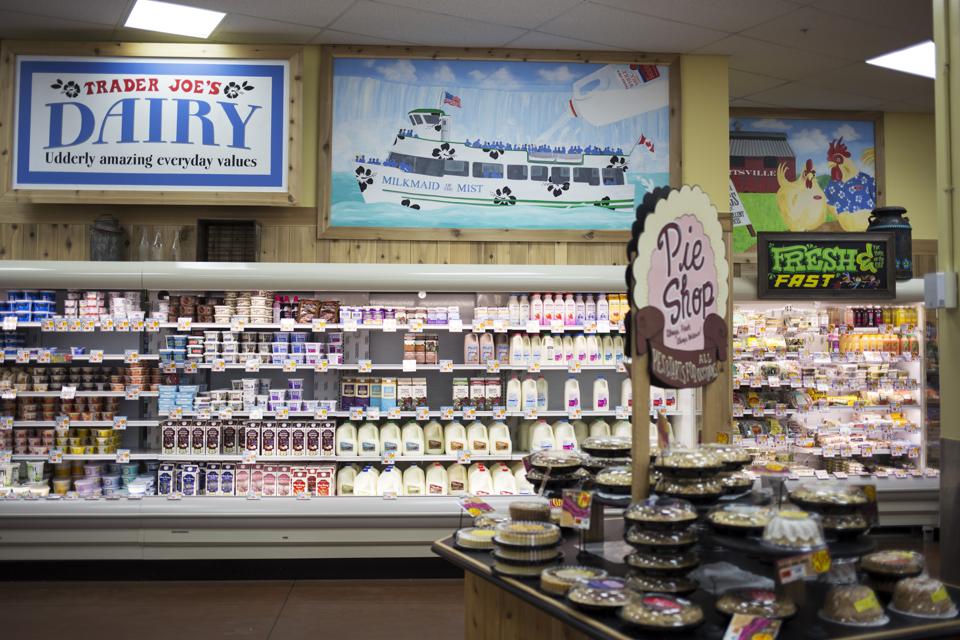
Trader Joe's
Trader Joe's2015 TORONTO STAR
If ever there were an ideal time to be a job seeker, this past year was surely it. Record-setting job gains and consistently low unemployment rates gave rise to a labor landscape not seen by Americans in decades, one where companies found themselves competing hard to attract and retain their workforces. In doing so, some emerged from the talent war as employers of choice.
Forbes teamed up with market research company Statista m to pinpoint the companies liked best by employees in our annual ranking of America’s best employers. The ranking is divided into two lists: one for the top large companies with more than 5,000 U.S. employees, and another for the top midsize companieswith 1,000 to 5,000. This article focuses on the former.
Over the past few years, a Monrovia, California-based grocery chain has been steadily scaling the ranks, rising 18 spots in two years to hit No. 2 in 2018. This year there was just one place left to climb, and the retailer proved it was up to the challenge, securing the No. 1 spot ahead of competitors Costco Wholesale (No. 4) and Wegmans Food Markets (No. 19). Since founding as convenience store Pronto Markets in 1958, America’s best employer has come a long way, even changing its name over the years. You may have heard of it: Trader Joe’s.
Aside from its name and number of locations—more than 400 and counting across 41 states and the District of Columbia—not much has changed at Trader Joe’s since founder (and original trader) Joe Coulombe opened shop. Its consistent attention to the basics may be the secret to its success. “We’ve been around for over 50 years, and we’ve never had layoffs. We stay true to what we know works for Trader Joe’s and our crew members,” says Jon Basalone, president of stores at Trader Joe’s. “You combine that with the pay, benefits and supportive, fun environment, and people tend to want to stick around.”
Trader Joe's

While many retailers cling to the notion that the minimum wage prescribed by the law must be the minimum wage paid to front-line employees, Trader Joe’s takes a different approach, establishing unique base wages in each of the markets in which it sets up shop. Each minimum wage is based on what it will take to attract the best in any given area, and over time, even part-time crew members can earn up to $24.75 an hour—nearly twice as much as the nation’s highest minimum wage, enjoyed by workers in Washington, D.C. Just as competitive pay isn’t considered a perk, neither is access to benefits, with health insurance, paid time off and a company-funded retirement plan offered to those who work part-time on the store floor and full-time in the C-suite alike. And because Trader Joe’s is open 18 hours a day, seven days a week, there’s a lot of flexibility. “No matter what people have going on in their lives, whether they’re students, whether this is their second job, whether they’re pursuing other interests and just need a job, we can help them,” Basalone says. “We hire individuals, we embrace their individuality and we get the work done through teamwork.”
Trader Joe’s culture of comradeship is strong—so strong it can be sensed by anyone who walks into a store. The crew’s distinctive uniform, donned by all since the 1960s, helps set the tone. “We all wear Hawaiian shirts and nametags—and the nametags all say ‘crew member’—especially here in the office,” Basalone says. “If a store calls and says, ‘We need someone to help us come bag,’ we’re ready.” So, on any given day, a student working part-time might find himself ringing up a customer’s Mandarin Orange Chicken alongside a long-time executive. And a few hours later, that same student might be called from behind the register and into the backroom to try whatever variation on Speculoos Cookie Butter the store has dared to dream up next during a tasting panel: a twice-weekly practice at Trader Joe’s, during which crew members sample and weigh in on products before they hit the shelves. Of the many tasks on a crew member’s to-do list, tasting panels are surely a favorite, so much so that 28 years later, Basalone can still recall the spread at his first: 10 dips, a frozen food and a baked good. “My first day at Trader Joe’s, I was being shown how to cut open a box and stock some frozen food, and someone came up and said, ‘Let’s go in the back—we’re having a tasting,’” he says. “The whole time, I was thinking, ‘Am I supposed to be doing this? I feel like I should be at work,’ and the person training me said, ‘No, this is a part of it. We’ve got to learn about what we sell.’”
Trader Joe's
Trader Joe's2015 TORONTO STAR
Trader Joe’s efforts to support its workforce surely haven’t hurt its ability to attract and retain talent, but the key to its status as a sought-after employer can’t be found in any compensation plan or inverted organizational chart, Basalone says: “It almost doesn’t feel like work—it feels more like we’re hosting a party and the customers are the honored guests. You get to meet and work with some amazing people, whether your fellow crew members or customers, and the interaction and energy that comes from that just makes it a really great place to work.”

Why Fortnite's Iceberg Points To A Giant Upcoming Boss Fight

Why Fortnite's Iceberg Points To A Giant Upcoming Boss Fight

Fortnite
Fortnite
 CREDIT: EPIC GAMES
Something strange happened in Fortnite: Battle Royale yesterday. Shortly after the game went live with update 7.20 yesterday, people noticed an iceberg tuck way down in the southwestern corner of the map. It had a health bar, but it was bigger than anything else in the game by a considerable margin: 5,000,000,000, to be exact. It also seemed to be going down, albeit not very quickly. As the pace accelerated, however, it became clear that people were actually damaging the thing in real time, and that the health bar on the iceberg represented the damage being done to the iceberg by all players, in all games: a far cry from the usually siloed-off instances that each match takes place in. The pace accelerated as more players learned about the iceberg, and eventually, the thing hit zero. In its place? Another weird, unbreakable bunker: anticlimactic
On its own, this seems a little obtuse, even for Fortnite. It wouldn’t make much sense as an in-game event: it came and ended without warning or anything particularly interesting, and most people playing the game probably never had any idea that it was happening at all. If it was an event, it was a strange, uneventful sort of event. But I don’t think the iceberg itself was the main point: something small like this is exactly what you would do if you were testing out a brand-new mechanic in the game and wanted to make sure it worked before its actual purpose.
So what would a mechanic like this be useful for? It seems pretty simple, actually: a world boss. That would mean a single, giant enemy with a single shared health bar between all worlds, basically a version of the iceberg that fought back, and one that likely had a whole lot more health. Communication between game instances isn’t really something Fortnite has ever done before, so the team would likely want to make sure it worked before any sort of event.
It dovetails with some of what we’ve been hearing about the upcoming Ice Storm event: leaked challenges point to something called an “Ice Legion”, which I first took to be an army of ice husks akin to the cube monsters from Fortnitemares. But what if it’s not? What if it’s either a single enemy or at the very least an army with some sort of mechanic that would require everyone to cooperate and take it down in real time? 
That’s my guess, at least: it would seem to make sense with this recent Iceberg thing, and it would also be something new and weird for Epic Games. Epic Games, for its part, has proven a commitment to the new and weird, and this one would both be something out of left field for this game and also contain potentially useful network tools for other Unreal projects. We’ll see what happens, and likely soon

Thursday, 18 April 2019

Wi-Fi Camera Buying Guide

Wi-Fi Camera Buying Guide


If you can’t be physically present to keep an eye on your home, business or vacation property, the next best thing is a state-of-the-art Wi-Fi camera that can stream real-time video to the device of your choice.
Unlike typical security cameras, network cameras, Cloud Cameras, or Wi-Fi Cameras don’t require a closed circuit TV system and special cabling to work. Instead, they connect to your home’s existing network via Ethernet or Wi-Fi, just like a laptop or tablet. Once connected, they stream live video you can access from any connected computer. The most flexible systems even let you view feeds through a web browser, smartphone or tablet; great for on-the-go viewing.
Wi-Fi cameras are the perfect solution for homeowners, business owners, pet owners, parents and anyone with something to watch. To help you sort through the choices, this guide offers some quick recommendations and plenty of info about key features to look for in your next camera.

Wi-Fi cameras for every need

The average home user needs reliable monitoring that doesn’t cost an arm and a leg, whereas a business owner might be interested in greater functionality and integration with existing security systems. Network cameras fall into two classes corresponding to these types of users.
Entry Level Cameras
These cameras are small, very affordable and perfect for the home user. Designed to be easy to set up and easy to use, they connect to a wireless home network at the push of a button. Key features include:
  • Wireless capability and compact size for flexibility of placement
  • Low cost so you can purchase enough cameras to cover multiple areas
  • Ability to check camera feeds from any web browser, iPhone®, Android®, Windows device or tablet
Professional Level Cameras
These cameras are more expensive than entry-level cameras. However, the added investment pays off in upgraded features that make it possible to integrate your cameras with dedicated alarm and sensor systems. Key features include:
  • Designed for permanent installation, with durable, rugged housing
  • Wired or wireless connectivity
  • Outputs for alarm and access control systems
This guide will focus on entry level network cameras, as they offer plenty of functionality for the average household. If you need more robust features, visit the network camera page on dlink.com to learn more.

Features to look for

Not all cameras work the same way or offer the same capabilities. In this section, we’ll look at the most important features and what they mean to you.
Web Access 
Some cameras require software to access a camera’s output and only computers that have this software installed can view the feed. Other cameras, like D-Link Wi-Fi Cameras, offer more flexibility and are viewable using a web browser so you can check your cameras locally or remotely from any connected computer.
Wi-Fi Connectivity 
Wireless cameras give you the flexibility to keep an eye on areas that would be too hard to reach with a wired model. Setup simply involves connecting it to your existing home network just like you would a laptop or tablet. 
Mobile Apps
For truly mobile viewing, you need a camera that allows you to see a live feed from your smartphone or tablet. D-Link’s mobile interface is a free app called mydlink™ Lite and is available for iPhone, Android and Windowsdevices. The app works with all mydlink-enabled cameras and is completely free to use. With mydlink Lite, you can view your home or office and keep an eye on your kids, pets and possessions from anywhere with a Wi-Fi, 3G or 4G connection.
Motion Sensing 
If you choose to record footage only when motion is detected, you’ll save space and know exactly what footage you need to view. If you plan to record footage, select a camera that makes it easy to set motion triggers as well as specify recording schedules so you can record exactly what you want directly to a local microSD card.
Enhanced Motion Detection 
For more reliable motion detection day and night, certain cameras feature passive infrared (PIR) sensors that use changes in heat to detect movement, rather than visual cues. This is great for monitoring at night when a standard camera would not be able to detect motion due to low light conditions.
  • Recommended Models: DCS-2630L, DCS-5222L
Night Vision iPhone day-night2
Some Wi-Fi cameras can illuminate a low-light or no-light area with infrared lighting so you can clearly see what is happening day or night. Infrared lighting is invisible to the human eye but allows the camera a clear view, even in total darkness.
Sound Detection
For those looking to keep an eye on their loved ones or their homes while on vacation, sound detection is the perfect addition to the standard motion detection feature. With automatic email alerts and the ability to configure sound detection for a specific area, cameras with this feature allow you to stay one step ahead.
MicroSD Card Slot for Local Recording
Sometimes you need the ability to record footage in addition to viewing a live stream. All D-Link Wi-Fi Cameras support recording to a storage device, but for seamless use, most feature a microSD card slot, so you can record directly to a microSD card and view footage from anywhere using the free mydlink app or by logging in to www.mydlink.com. Local recording provides all the ease of use of cloud recording but without the price and bandwidth issues. D-Link’s cameras with MicroSD slots use H.264 enhanced video compression, which allows you to record up to 5x more footage when compared to MJPEG.

D-Link’s most popular cameras

camera buying guide chart_4-17

Find your perfect match

Let’s consider your monitoring needs and identify network camera models that suit you.
The ClassicDCS-936L_front (1)
You might be new to the Wi-Fi Camera world and you want to try one before you go all in or you just want a quick, affordable home security solution. You need a camera with infrared LEDs that give you a clear view day or night and enhanced motion detection so you can be alerted if there’s any movement inside when there shouldn’t be. 
  • Recommended Camera: HD Wi-Fi Camera (DCS-936L)
The 180-Degree
You want to keep a watchful eye on those in your care and monitor their daily activities. With a 180-Degree lens you can capture an entire room with one Wi-Fi camera, making it perfect for your larger, open spaces. You need a discreet camera with sound and motion detection and the clarity of 1080p HD so you can check in on your loved ones for peace of mind, anytime.
  • Recommended Camera: Full HD 180-Degree Wi-Fi Camera (DCS-2530L)
The Pan & Tilt
No matter how many shoes they chew up or how many rolls of toilet paper they shred, you love your pets. You need a camera with pan/tilt functionality and night vision, so you can get a clear view of your cherished companion no matter where they wander.
  • Recommended Camera: HD Pan & Tilt Wi-Fi Camera (DCS-5030L)
The Outdoor
This durable, weather-proof camera lets you keep tabs on important outdoor areas like your home’s exterior, your back yard, or the outside of your store or office